For bookkeepers, small firms, and owner-operators
Match bank lines to the ledger. You approve.
Bank reconciliation on your computer. It proposes matches. You approve. No account. Optional US bank feeds via Plaid are available on Pro, opt-in, and off by default. Solo reconciles from CSV or Excel. Live two-way QuickBooks Online and Xero sync is not shipped; file import works today. For Solo, that file-import path is local and works without a live bank feed — an offline close on your computer once the CSV or Excel files are on the machine.
Runs on your computer. No account. Your books stay on your machine.
30-day money-back. Firm $899/year scales to 50 clients.
An illustrative close in Clearing, using demonstration data.
Moving a client from QuickBooks Desktop to Online?
Even if the file moves this month, the bank rec still has to close. Clearing is the leftover you sign on that rec, from the CSV or Excel you export — from Desktop, from Online, or from whichever books you can still export while the move is unfinished. We do not migrate the company file and we do not replace QuickBooks. You sign the leftover. We do not move the data.
Workbench
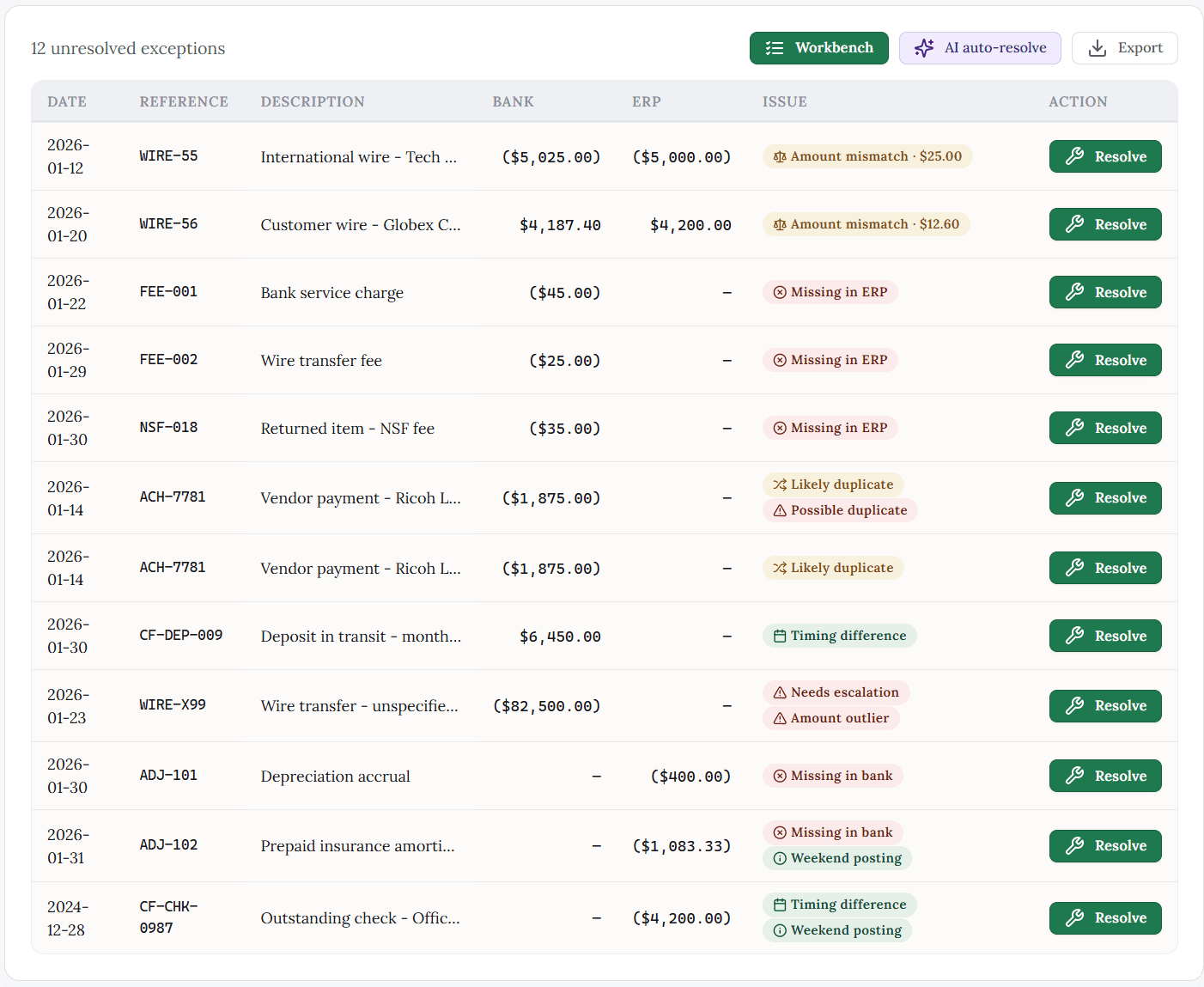
Mismatches that still need a person.
Amount mismatches, missing items, duplicates, timing — one list. Nothing is cleared until you approve.
Where your accounting software stops
Built-in matching and the spreadsheet clear the obvious lines. You still get the splits, the timing gaps, and the high-volume account.
Where the data comes from
Clearing
CSV or Excel bank and ledger exports. Supported layouts are detected from the file. OFX, QFX, and PDF statements are not supported yet.
A spreadsheet
Anything you can paste in, and may require manual formula maintenance.
Built-in matching
Leans on a live bank feed.
Why it matched
Clearing
The confidence score and the signals behind it, so a match is one you can defend.
A spreadsheet
The formula, if you can still read it. Nothing records why you accepted a line.
Built-in matching
Shows that it matched something.
Getting better over time
Clearing
When you resolve the same kind of exception a few times, Clearing can propose that treatment again. Those patterns stay on this machine. You still approve every match.
A spreadsheet
n/a in this comparison
Built-in matching
n/a in this comparison
Desktop and no-upload
Clearing is desktop bank reconciliation for bookkeepers and small firms: it runs on your computer, and with CSV or Excel import the bank exports and reconciled results stay on your machine. If you reconcile inside QuickBooks Online or Xero cloud, you’re using a live service workflow; Clearing is not shipped as a live two-way QBO/Xero sync today. In plain terms: local software, offline Solo close from files, no bank feed required to finish the month.
The audit trail
One record of what you signed.
What lined up, what you changed, who signed. The software does not decide. Export when a client or an auditor asks.
- Why it matched: the confidence score and the signals behind each match (amount, date, vendor), not just that it matched.
- What you did about it: each item you accepted, changed, or rejected, with a timestamp.
- Who signed off: the named preparer, and the reviewer too if a second person checked it.
- Tamper-evident record: once signed off, any later change shows.
- Ready to hand over: export the whole trail to PDF or CSV for a client or an auditor.
Demonstration data. See exactly what Clearing hands an auditor.
Every closed period is sealed with a SHA-256 hash. Verify it yourself with gbverify — our free, open-source, offline verifier.
Illustrative example — not real client data.
Bank reconciliation for bookkeepers without uploading client files
Clearing is GreenBar Systems' bank reconciliation tool for bookkeepers, small firms, and owner-operators, and it runs on your computer. When you bring in a CSV or Excel export from the bank and the ledger, those files stay on your machine. You approve the matches and the exceptions; the software does not decide, and when you sign off, the trail is a record of what you signed.
If you currently reconcile only inside QuickBooks Online, Clearing is the local alternative for that monthly close: export the files, work the rec on your machine, and sign there. Live two-way sync with QuickBooks Online or Xero is not shipped yet. What works today is bringing CSV or Excel bank and ledger exports onto your computer and reconciling there. Clearing Solo starts at $199/year.
Local bank reconciliation that runs offline on your computer
Clearing is local bank reconciliation software for bookkeepers: the app runs on Windows, macOS, or Linux, and the Solo path does not need a live bank feed. You import CSV or Excel bank and ledger exports, match and approve on your machine, and keep the reconciled work there — that is the offline monthly-close path. Optional US bank feeds via Plaid are available on Pro, opt-in, and off by default; they are not required for Solo, and they are not a live two-way QuickBooks Online or Xero sync. Comparing built-in QuickBooks bank matching to a desktop close? See Clearing vs QuickBooks bank matching — that page is about bank reconciliation tools, not QuickBooks clearing accounts.
What we can prove about Clearing today — and what we will not invent
Clearing is GreenBar Systems' desktop bank reconciliation tool. It proposes candidate matches from CSV or Excel bank and ledger exports on your computer, you approve every line, and a signed period can be sealed with a SHA-256 hash you can re-check offline with gbverify, GreenbarSystems' open-source verifier on GitHub.
What is on the public record today: Clearing Solo is $199/year, Pro is $499/year, and Firm is $899/year; every plan has a 30-day money-back guarantee; live two-way QuickBooks Online and Xero sync is not shipped; optional US bank feeds via Plaid are available on Pro, opt-in and off by default.
What is not on the public record yet: we are not publishing a customer count, an average minutes-saved figure, or a match-rate percentage from live books until those numbers are measured from real closes and cleared for honesty. Illustrative screenshots on this page use demonstration data only.
Straight about the edges
What Clearing can't do yet
You should find this here, not after you've already installed it. Clearing is built for the monthly close on small-business books. Here's where it stops today, and what's on the way.
- Imports CSV and Excel bank and ledger files. OFX, QFX, and PDF statement import aren't supported yet.
- Optional US bank feeds via Plaid are available on Pro, opt-in, and off by default. Solo reconciles from CSV or Excel. Live two-way QuickBooks Online and Xero sync is not shipped; file import works today.
- One currency per account. No multi-currency matching or FX revaluation yet.
- Each client reconciles on its own, with no group consolidation or cross-entity matching.
- Desktop only: Windows, macOS, and Linux. There's no mobile app.
Questions, answered
Common questions about Clearing
- What is Clearing?
- Clearing is bank reconciliation software for bookkeepers, small firms, and owner-operators. It proposes candidate matches, surfaces the exceptions that need judgment, and closes the period with a sealed sign-off trail. It runs on your own computer — Windows, macOS, or Linux — with no account.
- How is Clearing different from the bank matching built into QuickBooks or Xero?
- Clearing is built for splits, partial matches, timing differences, and duplicates. It records the signals behind a proposed match (amount, date, vendor) and locks the period with a tamper-evident sign-off trail.
- Does my bank data leave my computer?
- With CSV or Excel import, your bank files, ledger exports, and reconciled data stay on your machine — not even GreenBar sees them. Optional US bank feeds via Plaid are available on Pro, opt-in, and off by default. Solo reconciles from CSV or Excel. Live two-way QuickBooks Online and Xero sync is not shipped; file import works today.
- Does Clearing keep the books on my computer?
- Clearing runs on Windows, macOS, or Linux on the computer you already use. If you reconcile from CSV or Excel exports, your bank files and reconciled results stay on your computer — you approve the matches and exceptions. With CSV or Excel import you are not uploading client data to GreenBar for the software to decide.
- Can a small firm reconcile without uploading client files?
- For small firms, Clearing supports file import (CSV or Excel bank and ledger exports) so your client’s exported statements and reconcile work can stay on your machine. Optional US bank feeds on Pro are opt-in and off by default; the default workflow is file-based.
- Can I reconcile without uploading client files?
- Clearing is desktop-only by design (Windows, macOS, Linux). With CSV or Excel import, your bank exports and reconciled data stay on your computer and are not sent to a GreenBar cloud for reconciliation. That is the no-upload path. Optional US bank feeds via Plaid are available on Pro, opt-in, and off by default — they are not the Solo path, and they are not a live two-way QuickBooks Online or Xero sync.
- Is Clearing Solo an offline live bank-feed product?
- No. Clearing Solo reconciles from CSV or Excel exports on your computer. That is the no-upload path. Optional US bank feeds via Plaid are available on Pro, opt-in, and off by default — they are not the Solo path, and they are not a live two-way QuickBooks Online or Xero sync.
- Is Clearing local bank reconciliation software for bookkeepers?
- Yes. Clearing is desktop software that runs on your computer. For bookkeepers on Solo, local means CSV or Excel imports and a close you approve on that machine — not a cloud matching service deciding the books for you.
- Can bookkeepers reconcile bank activity offline with Clearing?
- Yes, on the Solo path. Export the bank and ledger files when you are online if you need to, then run the reconciliation in Clearing without a live bank feed and without uploading those files to GreenBar. That is offline reconciliation of bank exports, not an always-on offline bank feed. Optional US bank feeds via Plaid are available on Pro, opt-in, and off by default — they are not the Solo path, and live two-way QuickBooks Online and Xero sync is not shipped; file import works today.
- How is this different from reconciling only inside QuickBooks Online or Xero?
- QuickBooks Online and Xero work by live services and cloud workflows. Clearing is designed for the desktop monthly close: you export bank and ledger files, reconcile locally, and use Clearing’s approval + audit trail for what you changed and signed. It is not shipped as a live two-way QuickBooks Online and Xero sync; file import works today.
- What file formats and accounting systems does Clearing work with?
- CSV or Excel bank and ledger exports. Supported layouts are detected from the file. OFX, QFX, and PDF statements are not supported yet. QuickBooks Online and Xero work by file import today; live two-way sync is not shipped; file import works today.
- How much does Clearing cost?
- Clearing Solo is $199/year or $19/month. Clearing Pro is $499/year or $55/month and adds preparer–reviewer sign-off. Clearing Firm is $899/year or $89/month and scales the same tool to 50 clients with centralized audit history and priority support. Annual costs less than monthly. Every tier is the complete tool — paid tiers add collaboration, not basic capability. All plans include a 30-day money-back guarantee.
- What operating systems does Clearing run on?
- Windows, macOS, and Linux — all fully supported. There is no mobile app; Clearing is desktop-only by design, so your books stay on the machine you already use.
- What does the audit trail actually record?
- For every match, Clearing records the confidence score and the signals behind it (amount, date, vendor), what you accepted, changed, or rejected with a timestamp, and who signed off — preparer and reviewer if you use two-person approval. Once the period is signed off it's sealed, and any later change is visible. You can export the whole trail to PDF or CSV for a client or an auditor. A sample audit trail is available on this page.
- What can Clearing not do yet?
- OFX, QFX, and PDF statement import aren't supported. Optional US bank feeds via Plaid are available on Pro, opt-in, and off by default. Solo reconciles from CSV or Excel. Live two-way QuickBooks Online and Xero sync is not shipped; file import works today. Each account is single-currency; there's no multi-currency matching or FX revaluation. Each client reconciles on its own, with no group consolidation. And there's no mobile app.
- What evidence does Clearing leave for a client or auditor?
- For each match, Clearing can record a confidence score and the signals behind it (amount, date, vendor), what you accepted, changed, or rejected with a timestamp, and who signed off. After sign-off, the period can be sealed; later changes show. You can export the trail to PDF or CSV. Closed periods can carry a SHA-256 hash verifiable offline with gbverify. Sample audit-trail materials on this page use demonstration data, not a real client file.
How it works
From bank file to a closed, signed-off period in three steps
- 1
Load your data
CSV or Excel bank and ledger exports. Supported layouts are detected from the file. OFX, QFX, and PDF statements are not supported yet.
- 2
Match and review
Clearing proposes candidate matches and surfaces the rest. You spend your time on the exceptions that need judgment.
- 3
Sign off and close
Clear the exceptions, route it for a reviewer if you have one, and lock the period with the full trail behind it.